|
2. Viewing Outstanding Payments and Records
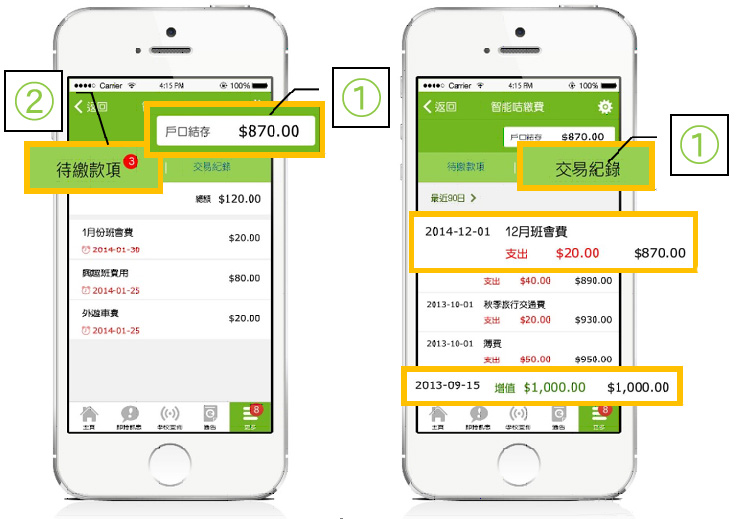
- Step 1: Upon entering the "ePayment" page, parents can view two main lists: Outstanding Payments (待繳款項) and Transaction Records (交易紀錄). The student's account balance is displayed at the top right corner.
- Step 2: Checking Outstanding Payments Tap "Outstanding Payments" on the left to open the list, which includes:
- The total amount of outstanding payments.
- Specific items requiring payment, their due dates, and the respective amounts.
- Step 3: Checking Transaction Records Tap the "Transaction Records" (交易紀錄) tab to view:
- Past expenditure items, payment dates, and the amounts deducted.
- Past account top-up records, dates, and the amounts added.
|
|




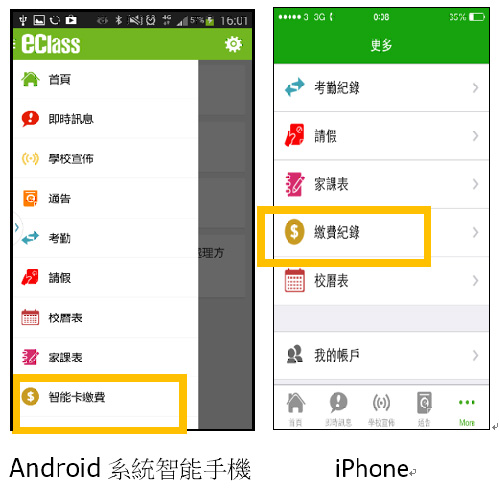
 to enter the page.